
Cost Comparison: SMS Auth vs Inbound WhatsApp
Compare traditional SMS OTP pay-per-dispatch costs with LessOTP inbound WhatsApp authentication billed strictly on successful verifications.
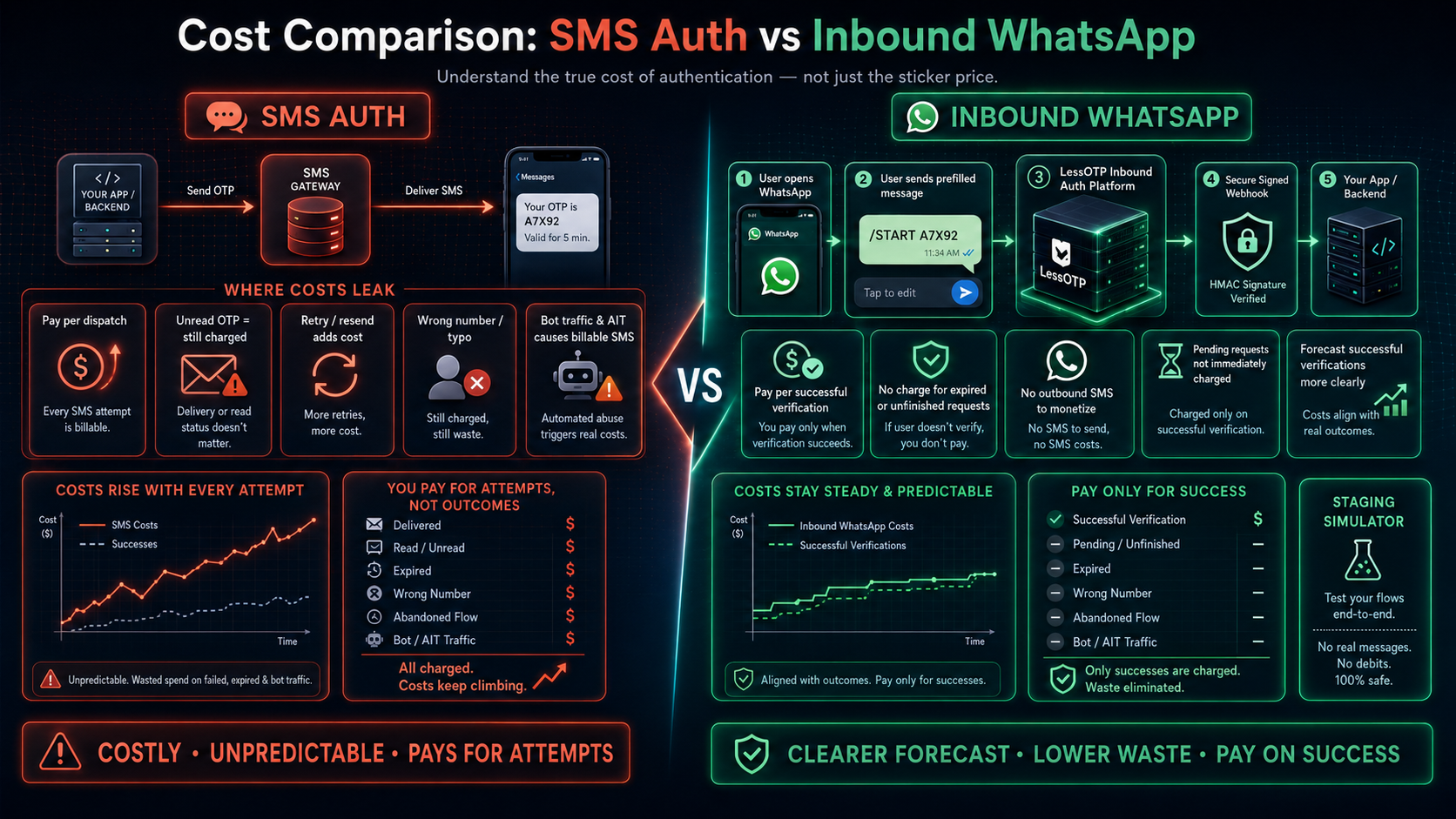
Why are SMS authentication costs difficult to forecast?
SMS OTP billing counts every message your application sends. Budget is consumed by late deliveries, abandoned flows, wrong numbers, and bot-triggered attempts. As traffic grows, delivery costs and fraud-mitigation overhead grow at the same time.
LessOTP Inbound WhatsApp Authentication reverses this model: users initiate a /START message from WhatsApp, and production credit is deducted only after a valid verification completes.
Cost structure: SMS Auth vs Inbound WhatsApp
| Cost Factor | Traditional SMS OTP | LessOTP Inbound WhatsApp |
|---|---|---|
| Billing model | Pay for every SMS dispatch | Pay per successful production verification |
| Expired or unread OTP | Still charged | No credit deduction |
| Bot traffic / AIT | Can trigger thousands of billable SMS messages | Does not trigger outbound SMS from the platform |
| User retry | Every resend adds cost | Pending requests are not immediately charged |
| Staging/testing | Usually consumes test balance or a separate vendor setup | Per-App simulator without real messages or debits |
| Result integration | Provider polling or callbacks | Signed HMAC webhook with retries |
How to forecast authentication spend more clearly
SMS OTP
Forecast every delivered attempt, including retries, failed messages, and suspicious traffic. Successful verifications alone do not represent final cost.
LessOTP Inbound WhatsApp
Forecast successful production verifications. Expired, mismatched, and unfinished requests do not deduct credit.
Test the API contract without messaging spend
Before updating your forecast, test the full flow with a staging App. The endpoint, response, verification engine, and client webhook match production; only real message delivery and credit deduction are disabled.
curl -X POST https://lessotp.com/api/v1/staging/auth/request \
  -H "Authorization: Bearer YOUR_STAGING_API_KEY" \
  -H "Content-Type: application/json" \
  -d '{
    "channel": "whatsapp"
  }'
Staging request response:
{
  "status": "success",
  "data": {
    "request_id": "req_8f7d6c5b4a",
    "unique_code": "A7X92",
    "channel": "whatsapp",
    "wa_link": "https://wa.me/628999999999?text=/START+A7X92",
    "expires_in": 180,
    "mode": "frictionless"
  }
}
The Simulator then delivers a verification event to your webhook:
{
  "event": "verification.success",
  "channel": "whatsapp",
  "request_id": "req_8f7d6c5b4a",
  "phone_number": "6281234567890",
  "timestamp": "2026-08-24T10:00:00Z"
}
Prevent webhooks from processing billing or login twice
Validate the HMAC over the raw request body using your App signing secret and store the Idempotency-Key before processing the event:
import { createHmac, timingSafeEqual } from "node:crypto";

function verifyLessOTPWebhook(rawBody: string, signature: string, secret: string) {
  const expected = createHmac("sha256", secret).update(rawBody).digest("hex");
  const received = Buffer.from(signature, "hex");
  const expectedBuffer = Buffer.from(expected, "hex");

  return received.length === expectedBuffer.length &&
    timingSafeEqual(received, expectedBuffer);
}

// Simpan Idempotency-Key dan abaikan delivery yang sudah pernah diproses.
Read the complete billing and webhook contract in LessOTP API documentation.
Pay only when verification truly succeeds
Move your OTP flow to inbound WhatsApp or Telegram, then test it first in the LessOTP Staging Simulator without messaging cost.
Test staging integration